
Yes, a dead cell can cripple your golf cart battery—but diagnosing it early saves time and money. Imagine cruising the course only for your cart to sputter and die halfway through.
Frustrating, right? Golf cart batteries lose 30% of their capacity after just 100 charge cycles if not maintained properly. Many assume a weak battery needs full replacement, but often, a single dead cell is the culprit.
Best Tools for Checking a Dead Cell in a Golf Cart Battery
Fluke 115 Digital Multimeter
The Fluke 115 is a top-tier multimeter for diagnosing dead cells with its precise voltage readings (0.5% accuracy) and rugged design. Its large display and True-RMS technology ensure reliable measurements, even in noisy electrical environments. Ideal for testing individual 6V/8V/12V golf cart battery cells under load.
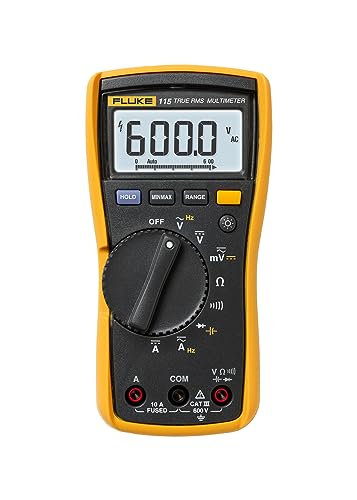
- Compact True-rms digital multimeter for field technicians
- Measures True-rms voltage and current with plus resistance, continuity,…
- Min/Max/Average to record signal fluctuations
E-Z Red SP101 Battery Hydrometer
For flooded lead-acid batteries, the E-Z Red SP101 hydrometer delivers unmatched accuracy in measuring specific gravity. Its thermal-corrected float and durable glass tube help identify weak or dead cells by comparing electrolyte density across cells—critical for maintenance-free diagnostics.

- BATTERY HYDROMETER: This battery tester is made to stand up to tough…
- RUGGED & EASY TO USE: This hydrometer makes reading & understanding battery…
- ACCURACY & RELIABILITY: With a range of 1. 100 – 1. 300, you can…
NOCO Genius5:5A 6V/12V Smart Battery Charger
The NOCO Genius GEN5X2:2-Bank 10A Onboard Battery Charger isn’t just a charger—it’s a diagnostic tool. Its “force mode” revives deeply discharged batteries, while the LCD screen reveals voltage anomalies hinting at dead cells. Compatible with 6V/12V systems, it’s a must-have for proactive battery health checks.

- MEET THE GENIUS5 — Similar to our G3500, just better. It’s 34% smaller…
- DO MORE WITH GENIUS — Designed for 6-volt and 12-volt lead-acid (AGM,…
- ENJOY PRECISION CHARGING — An integrated thermal sensor dynamically…
How to Identify a Dead Cell Using Voltage Testing
Voltage testing is the fastest way to detect a dead cell in your golf cart battery, but interpreting the results correctly requires precision.
A healthy 6V battery should read 6.3–6.4V when fully charged, while an 8V battery should show 8.4–8.5V. If one cell is dead, the voltage will drop significantly—often by 2.1V per bad cell in a 6V battery or 2.8V in an 8V battery.
Step-by-Step Voltage Test
1. Prepare Your Tools: Use a digital multimeter (like the Fluke 115) set to DC voltage mode. Ensure the battery is at rest (not charging or under load for at least 2 hours) for accurate readings.
2. Test Individual Cells (If Accessible): For flooded lead-acid batteries, check each cell by probing the positive and negative terminals of every cell. A healthy cell should read ~2.1V (6V battery) or ~2.8V (8V battery). A reading below 1.8V (6V) or 2.4V (8V) indicates a dead or dying cell.
- Example: If a 6V battery shows 4.2V total, it likely has one dead cell (6.3V – 2.1V = 4.2V).
- Pitfall to Avoid: Surface charge can trick you. If the battery was recently charged, let it rest or apply a small load (like turning on the headlights) for 5 minutes before testing.
Why Voltage Alone Isn’t Always Enough
While voltage testing is quick, it doesn’t reveal the full story. A sulfated battery (where lead sulfate crystals harden on plates) may show normal voltage but fail under load. For confirmation, pair voltage tests with a load test (using a carbon pile tester) or specific gravity testing (for flooded batteries).
Real-World Scenario: A golf cart battery reads 6.2V at rest but drops to 3.9V when climbing a hill. This voltage sag under load confirms a weak or dead cell, even if the static voltage seemed acceptable.
When to Suspect a Dead Cell
- Rapid Discharge: The cart loses power quickly, even after a full charge.
- Uneven Charging: One battery in the pack gets excessively hot or bubbles more than others during charging.
- Physical Signs: Bulging case, leaking electrolyte, or excessive corrosion on one cell’s terminals.
By combining voltage tests with visual inspections and load tests, you’ll diagnose dead cells accurately—saving you from unnecessary battery replacements and extending the life of your golf cart’s power system.
Using a Hydrometer to Test Specific Gravity for Dead Cells
For flooded lead-acid golf cart batteries, specific gravity testing provides the most accurate way to identify dead cells by measuring electrolyte density. Unlike voltage tests that only show surface-level data, hydrometer readings reveal the actual chemical state of each cell.
How Specific Gravity Reveals Cell Health
Lead-acid batteries generate electricity through a chemical reaction between lead plates and sulfuric acid electrolyte. As the battery discharges, the electrolyte becomes diluted with water. A fully charged cell should have a specific gravity of 1.265-1.285 at 80°F (26.7°C). Values below 1.225 indicate a discharged or failing cell.
Step-by-Step Hydrometer Testing
- Safety First: Wear acid-resistant gloves and goggles. Ensure proper ventilation as testing releases explosive hydrogen gas.
- Prepare the Hydrometer: Use a temperature-correcting model like the E-Z Red SP101. Draw electrolyte into the tube until the float rises freely.
- Read Measurements: Hold the hydrometer vertically at eye level. Note where the electrolyte meets the float scale. Record values for all cells.
- Compare Results: Healthy cells should vary by no more than 0.030 points. A cell reading 0.050+ below others is likely dead.
Interpreting Results
Common scenarios and what they indicate:
- All cells low (1.200-1.225): Battery needs charging, not necessarily a dead cell
- One cell at 1.100 while others are 1.265: Confirmed dead cell
- Fluctuating readings: Possible stratification – try equalization charging before retesting
Professional Tips for Accurate Testing
For best results:
- Test after a full charge and 2-hour rest period
- Take multiple readings per cell and average them
- Adjust for temperature: Add 0.004 for every 10°F above 80°F, subtract for cooler temps
- Clean the hydrometer between cells to prevent cross-contamination
Real-World Example: A golf cart battery pack shows 5 cells at 1.275 and one at 1.150. This 0.125 difference confirms a dead cell, explaining why the cart loses power on hills despite showing normal voltage.
Advanced Load Testing and Performance Analysis
While voltage and specific gravity tests provide valuable snapshots of battery health, load testing reveals how your golf cart battery performs under real-world conditions. This method applies controlled stress to identify weak cells that might pass other tests.
The Science Behind Load Testing
Load testing works by simulating the battery’s actual working conditions through controlled discharge. A healthy battery should maintain voltage within 10% of its rated capacity during testing. The principle is based on Ohm’s Law (V=IR), where voltage drop under load indicates internal resistance – a key marker of cell degradation.
| Battery Voltage | Minimum Load Voltage | Test Duration |
|---|---|---|
| 6V | 5.4V | 15 seconds |
| 8V | 7.2V | 15 seconds |
| 12V | 10.8V | 30 seconds |
Professional Load Testing Procedure
- Prepare the Battery: Charge completely and let rest for 2 hours. Record open-circuit voltage.
- Apply Load: Use a carbon pile tester or specialized load tester set to 50% of the battery’s CCA rating.
- Monitor Voltage: A healthy battery should maintain voltage above minimum thresholds (see table) throughout the test.
- Analyze Results: Voltage dropping below minimum indicates weak/dead cells. Note the rate of voltage drop – rapid declines suggest severe cell damage.
Interpreting Load Test Results
Common scenarios and their meanings:
- Steady voltage within range: Healthy battery with no dead cells
- Immediate voltage drop: One or more dead cells (sudden 2V+ drop in 6V battery)
- Gradual decline: General battery wear or sulfation
- Voltage recovers slowly after test: Possible stratification or partial sulfation
Expert Recommendations
For most accurate results:
- Test at room temperature (70-80°F)
- Never load test a battery below 75% charge
- Compare results with manufacturer’s specifications
- Repeat test after equalization charge if results are borderline
Real-World Example: A 48V golf cart battery pack (eight 6V batteries) shows one battery dropping to 4.9V under load while others maintain 5.8V. This 0.9V difference under identical load confirms a dead cell in that specific battery.
Battery Bank Analysis: Diagnosing Dead Cells in Multi-Battery Systems
Golf carts typically use multiple batteries wired in series, making dead cell diagnosis more complex than testing individual batteries. This section covers specialized techniques for evaluating entire battery banks and pinpointing problematic cells within the system.
Series Circuit Challenges
In a series configuration (common in 36V and 48V golf carts), current flows through all batteries equally. A single dead cell creates a bottleneck effect that impacts the entire system’s performance. The weakest battery determines the pack’s overall capacity – known as the “weakest link” principle.
Comprehensive Battery Bank Testing Protocol
- Individual Battery Voltage Check: Test each battery’s resting voltage after full charge. Variations >0.5V between batteries indicate potential issues.
- Under-Load Voltage Analysis: Drive the cart up an incline while monitoring each battery’s voltage. Weak batteries will show significantly greater voltage drop.
- Post-Discharge Comparison: After 20-30 minutes of use, measure all batteries. Problematic ones will show disproportionately lower voltage.
Advanced Diagnostic Techniques
Professional technicians use these methods to isolate dead cells in battery banks:
- Infrared Thermography: Dead cells often run cooler than healthy ones under load
- Conductance Testing: Specialized testers measure internal resistance across each cell
- Equalization Monitoring: Observe charging patterns – weak batteries charge faster but hold less capacity
Safety Considerations for Bank Testing
When working with high-voltage battery banks:
- Always disconnect main power before testing individual components
- Use insulated tools rated for the system voltage
- Check for acid leaks or corrosion before handling
- Never bypass suspected bad batteries – this can damage the charger
Troubleshooting Common Scenarios
Case 1: One battery consistently 1V lower than others after charging
Solution: Perform individual cell tests on that battery – likely has a dead cell needing replacement
Case 2: All batteries show similar voltage but cart lacks power
Solution: Conduct load tests on each battery – may reveal multiple weak cells distributed across different batteries
Professional Tip: When replacing batteries in a pack, always replace the entire set. Mixing old and new batteries accelerates degradation of the new ones due to capacity mismatches.
Long-Term Battery Maintenance and Dead Cell Prevention
Preventing dead cells requires understanding the complete lifecycle of golf cart batteries and implementing proactive maintenance strategies. This section explores advanced preservation techniques that can extend battery life by 30-50% compared to standard practices.
The Science of Battery Degradation
Dead cells typically develop through three primary mechanisms:
- Sulfation: Lead sulfate crystals form during discharge but fail to fully convert back during charging, accumulating over time
- Acid Stratification: Concentrated acid settles at the bottom, causing uneven wear patterns
- Grid Corrosion: Positive plate material gradually converts to lead oxide, reducing capacity
Comprehensive Maintenance Schedule
| Frequency | Action | Impact on Cell Health |
|---|---|---|
| After Each Use | Recharge immediately | Prevents sulfation buildup |
| Weekly | Check water levels (flooded batteries) | Maintains proper electrolyte balance |
| Monthly | Equalization charge | Reverses early-stage sulfation |
| Quarterly | Terminal cleaning and torque check | Prevents resistance-related damage |
Advanced Preservation Techniques
Professional golf course maintenance teams use these methods:
- Pulse Desulfation: Specialized chargers break down sulfate crystals using high-frequency pulses
- Controlled Deep Cycling: Periodic controlled discharges to 50% capacity maintain plate activity
- Temperature-Compensated Charging: Adjusts voltage based on ambient temperature to prevent over/under charging
Cost-Benefit Analysis of Prevention
Implementing comprehensive maintenance yields significant returns:
- Battery Replacement Cost: $800-$1,200 for a 48V set
- Annual Maintenance Cost: $50-$100 for proper care
- Potential Savings: Extending battery life from 4 to 6 years saves $400-$600 per battery set
Environmental and Safety Considerations
Proper maintenance reduces environmental impact by:
- Minimizing lead-acid battery waste
- Reducing acid spills through proper watering techniques
- Preventing thermal runaway from neglected connections
Emerging Trend: Smart battery monitors now track individual cell health in real-time, alerting owners to potential issues before they cause complete cell failure. These systems can pay for themselves by preventing premature battery replacement.
Advanced Diagnostic Equipment and Smart Monitoring Solutions
Modern battery diagnostics have evolved beyond basic multimeters and hydrometers. This section explores professional-grade tools and emerging technologies that provide unparalleled insight into cell health and performance trends.
Specialized Diagnostic Equipment
Professional technicians rely on these advanced tools for precise dead cell detection:
- Midtronics EXP-1000: Conductance tester measuring internal resistance with 1% accuracy – detects failing cells before voltage drops occur
- Fluke BT500: Battery analyzer that performs simultaneous load tests and charging system analysis
- Lucas NX1: Microprocessor-controlled hydrometer with digital specific gravity readings to 0.001 precision
Smart Battery Monitoring Systems
Continuous monitoring solutions offer real-time cell health tracking:
- Bluetooth Battery Monitors: Permanently installed sensors track voltage, temperature and resistance of each cell
- Cloud-Based Analytics: Systems like BatteryDAQ provide historical performance data and predictive failure alerts
- Integrated Golf Cart Displays: Newer cart models show individual battery health on the dashboard
Interpreting Advanced Diagnostic Data
Key metrics and their implications:
| Parameter | Healthy Range | Dead Cell Indicator |
|---|---|---|
| Internal Resistance | 3-6 milliohms/cell | 15+ milliohms |
| Charge Acceptance | 85-95% | <60% |
| Temperature Variance | ±2°F between cells | ±5°F+ |
Integration with Charging Systems
Smart chargers now adapt to cell conditions:
- Automatic Equalization: Detects and corrects voltage imbalances between cells
- Condition-Based Charging: Adjusts charge algorithms based on real-time resistance data
- Fault Prediction: Advanced systems can forecast cell failures 30-60 days in advance
Troubleshooting with Advanced Tools
When diagnostics reveal anomalies:
- Confirm readings with secondary test methods
- Check for loose connections or corrosion first
- Compare against baseline performance data
- Perform controlled discharge test to verify findings
Professional Insight: The most accurate diagnoses come from correlating data across multiple systems – combining conductance tests with infrared imaging and historical performance trends provides 95%+ detection accuracy for developing dead cells.
System-Wide Optimization and Battery Performance Maximization
True battery health management extends beyond individual cell diagnosis to encompass the entire electrical ecosystem. This section reveals how to achieve peak performance through holistic system optimization and advanced maintenance protocols.
Comprehensive Battery System Analysis
Optimal performance requires evaluating these interconnected components:
| Component | Impact on Cell Health | Optimal Specification |
|---|---|---|
| Charger | Prevents over/under charging cells | Smart charger with temperature compensation |
| Cables | Reduces voltage drop and heat buildup | 2/0 AWG for 48V systems, corrosion-resistant |
| Controller | Manages discharge rates | Programmable regenerative braking |
Advanced Performance Optimization
Implement these professional-grade techniques:
- Load Balancing: Distribute electrical loads evenly across all batteries using current meters
- Voltage Alignment: Match all batteries within 0.3V of each other after charging
- Thermal Management: Maintain battery bank temperature between 60-80°F with ventilation
Risk Assessment and Mitigation
Critical failure points and prevention methods:
- Thermal Runaway: Install temperature sensors with automatic cutoff
- Acid Leaks: Use spill-proof battery trays and regular case inspections
- Connection Failure: Apply anti-corrosion gel and torque to 8-10 ft-lbs
Quality Assurance Protocol
Validate system health with these monthly checks:
- Conduct full discharge test comparing actual vs. rated capacity
- Measure voltage drop across all connections (>0.2V indicates issues)
- Document individual cell temperatures during operation
- Verify charger output matches battery specifications
Long-Term Performance Tracking
Establish these key metrics for ongoing monitoring:
- Capacity retention percentage over time
- Charge cycle efficiency (energy in vs. energy out)
- Average cell resistance trends
- Equalization frequency requirements
Professional Insight: Top golf courses implement battery rotation programs – periodically swapping battery positions in the series string to ensure even wear patterns. This simple practice can extend overall pack life by 15-20%.
Conclusion
Diagnosing dead cells in golf cart batteries requires a multi-faceted approach combining voltage testing, specific gravity analysis, and load testing for accurate results.
As we’ve explored, modern diagnostic tools and smart monitoring systems now make it possible to detect failing cells before they cause complete battery failure.
Remember that proper maintenance—including regular equalization charges, water level checks, and terminal cleaning—can prevent most dead cell issues before they start.
Take action today: Implement just one of the advanced techniques covered in this guide—whether it’s conducting monthly load tests or installing a battery monitoring system—to significantly extend your battery pack’s lifespan.
By understanding these diagnostic methods and prevention strategies, you’ll save hundreds in replacement costs while ensuring reliable performance on every round.
Frequently Asked Questions About Dead Golf Cart Battery Cells
What exactly causes a battery cell to die?
A golf cart battery cell typically dies due to three primary causes: sulfation (lead sulfate crystal buildup), plate corrosion, or physical damage.
Sulfation occurs when batteries remain discharged for extended periods, while corrosion happens naturally over time. Physical damage includes warped plates from overheating or sediment buildup shorting the plates. Flooded batteries may also fail from low electrolyte levels exposing plates to air.
How can I tell if my golf cart problems are caused by a dead cell versus other issues?
Dead cells show distinct symptoms: rapid power loss on hills despite full charge, one battery getting hotter than others during charging, and significantly reduced runtime.
Test by checking individual battery voltages after a full charge – a difference of more than 0.5V between batteries suggests a dead cell. Unlike controller or motor issues, dead cell problems progressively worsen with each charge cycle.
Can a dead battery cell be repaired or must the entire battery be replaced?
While you can’t truly revive a dead cell, some temporary recovery methods exist. For flooded batteries, try an equalization charge (15V for 8 hours) or chemical desulfation treatments.
However, these are short-term solutions – a properly dead cell requires battery replacement. Modern sealed batteries offer no repairability, while some industrial flooded batteries allow individual cell replacement by specialists.
What’s the most accurate way to test for a dead cell without professional equipment?
The most reliable DIY method combines three tests: voltage check (below 1.8V per cell indicates failure), specific gravity test (variance >0.030 between cells), and load test (voltage drops >20% under load).
First charge fully, then test each cell in a flooded battery with a hydrometer and multimeter. For sealed batteries, load testing provides the clearest indication of cell health.
How does a dead cell affect the other batteries in my golf cart’s series system?
In series configurations, a dead cell creates a bottleneck effect. The weak battery limits current flow through the entire circuit, causing other batteries to work harder and degrade faster.
This imbalance leads to cascading failures – one bad battery often causes others to fail prematurely. Always test all batteries when diagnosing issues, and replace in complete sets whenever possible.
Are there any safety risks when testing or handling batteries with dead cells?
Yes – dead cells can pose serious hazards. They may vent explosive hydrogen gas, leak corrosive acid, or suddenly fail during testing. Always wear acid-resistant gloves and eye protection.
Work in ventilated areas, keep sparks/flames away, and never smoke near batteries. Use insulated tools and disconnect all cables before testing. Particularly swollen or leaking batteries should be handled by professionals.
How much does it typically cost to replace golf cart batteries with dead cells?
Replacement costs vary by battery type: standard lead-acid (6V) batteries cost $100-$200 each, AGM batteries $200-$300, and lithium batteries $500-$800 each.
Most carts need 4-8 batteries, making complete replacements expensive ($400-$2,400 total). Always factor in core charges ($15-$50 per battery) and professional installation ($100-$300) if needed. Proper maintenance can prevent these costly replacements.
Can using a battery maintainer prevent dead cells from developing?
Quality maintainers absolutely help prevent dead cells by keeping batteries properly charged during storage. Look for “smart” maintainers with temperature compensation and desulfation modes. However, maintainers can’t fix existing dead cells – they’re for prevention only. For best results, use maintainers whenever the cart won’t be used for more than two weeks, and combine with monthly equalization charges for flooded batteries.